



The first time I ever saw a Sharpie, it was in Pop’s hand, and he was writing the date on the garage freezer door at the bottom of a column of dates. At the top of the column was the label “Defrosted”. You could find a similar column of dates on the side of our furnace (labeled “Filter Changed”), on our hot water tank (labeled “Anode Changed”), and even on the top of our lawn mower (labeled “Blade Sharpened”). When a new appliance was added to the house, the date was written somewhere on it. It was a terrific way to make sure that key information was close at hand. And when these Sharpie notes caught your eye, it also served as a reminder of when the next update was needed.
I was reminded of this habit of Pop’s when my sister sent us a picture of what she found when she opened up her water sprinkler timer box: a Sharpie-scribed note from Pop, “INSTLD 9-11-94 JFB”.
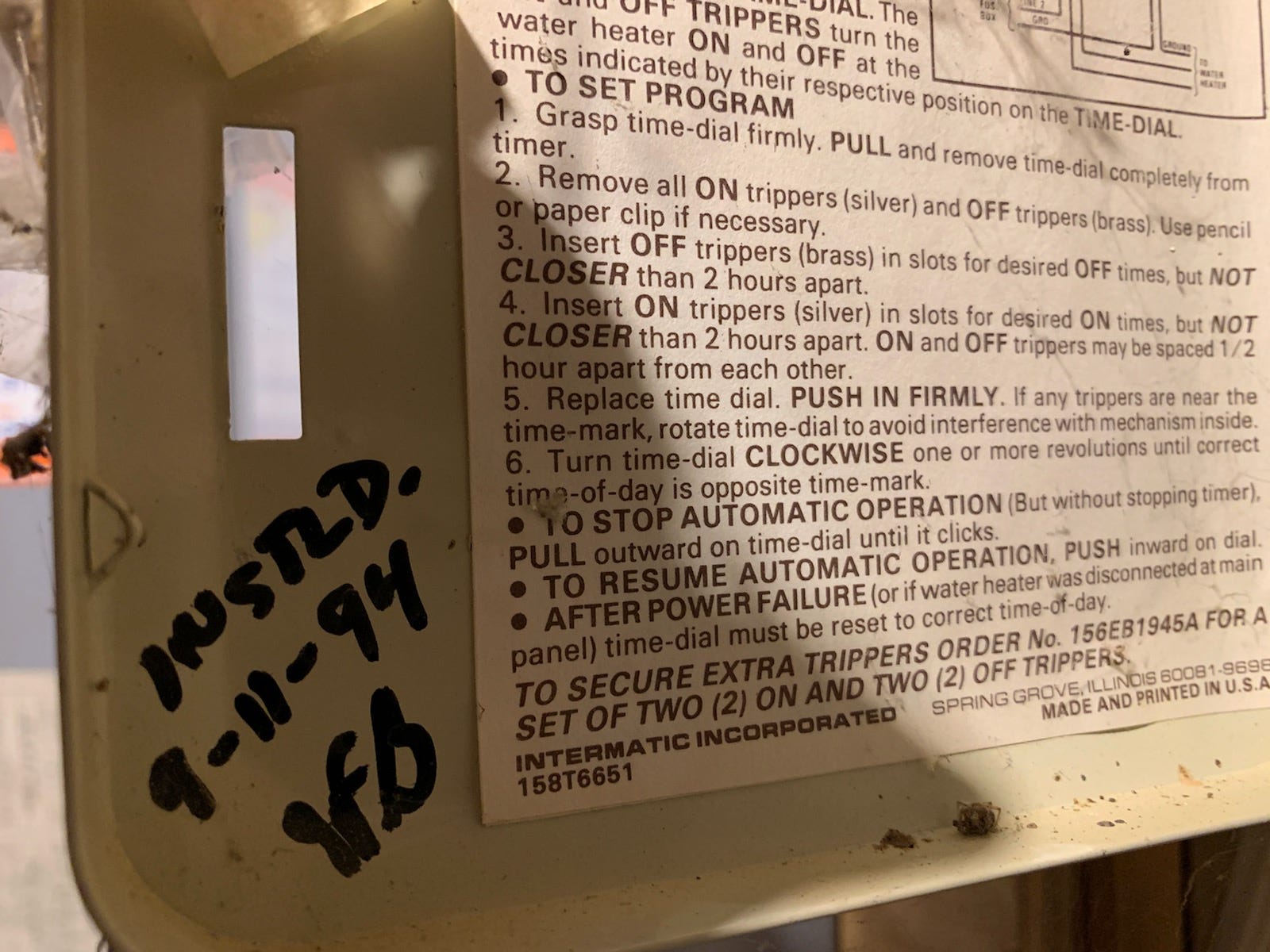
Pop left us in 2002. but his notes continue to surprise us … and help us. Once I got past the nostalgia of this memory, I realized that my dad’s Sharpie habit is the earliest example in my life of a key concept: the Team External Brain.
Just as you benefit from having an External Brain1, your team benefits from having a Team External Brain. In a group setting, it typically goes by a different name. You’ve probably heard it called the team’s “knowledge base.” It is what the team turns to for all the information needed to run the team. Your own family is also a team, and can readily benefit from having a family knowledge base.
What my dad started with Sharpie scribbles on appliances was the analog version of this knowledge base. And my mom managed much of the rest of this analog Family External Brain, in the form of all the documents she stored in file cabinet drawers in her desk.
As Charu and I grew our own family, we began with similar analog systems. But over time our system has become increasingly digital. At this point, we’re probably 90% of the way to an entirely digital system. Here is the Bogdan Family’s External Brain, originally described in my list of the OneNote notebooks I use for my own External Brain1:
Bogdan notebook - This is a shared notebook that my whole family uses (yes, I was able to convince them that all of our information in one place is a good idea).
Actions, Projects, Someday, and Routines sections - Similar to my own Work notebook, but this is for my family’s work management system, not mine.
Family section - This is where we have all information for the family, e.g. house, car, medical, and relevant research family members have done.
Family Travel section - We now do enough of our trip planning in OneNote to earn its own section, where we have a page for each trip we’re organizing. We also keep these pages around so that we can refer to them if needed when planning another trip.
Again, the choice of tool here is up to you. Notion, Obsidian, or a large whiteboard. It’s not about which tool you use. It’s about the goal, which is the same as for your own individual External Brain: Use a tool that can capture more of the important details and be readily and reliably recalled, instead of depending on your brain to keep all this stuff straight.
The success of a Team’s External Brain can be measured by how regularly it is leveraged, and how motivated the team is to keep adding to it.
Start with the more infrequent duties
I previously described the components of a work management system, as represented in my OneNote1: Actions, Projects, Someday, and Routines. Here I want to drill into the Routines component. I introduced this section as:
Routines - Each page in this section represents a routine that I follow as part of my workflow. I have Page Groups titled Daily, Weekly, Biweekly, Monthly, Quarterly, Semi-Annually, and Annually. The page title is the name of the routine, and the contents describe the process I follow for that routine.
When you’re working on building up your Team’s External Brain, you start building the Routines section for the more infrequent routines first: Quarterly, Semi-Annually, and Annually. At home, it’s easier for you to remember where you put your car keys than where you put your spare furnace filters. You use your car keys daily, but you only ever touch your furnace filters every six months. And the same goes for work.
Here are two good examples, one that helped my team at work and one that helps my family at home.
Work: People Discussions
My team did people discussions three times per year. While the managers that reported to me had well established processes for all of their common responsibilities, it was always a challenge to get them on track for people discussion preparation. Four months between conversations gave a lot of time for them to forget what process they had followed the last time. My solution was to completely document the process, at a painstaking level of detail.
This accomplished five things:
The managers on my team had a clear process to follow, which lessened the “mental overhead” required for this very important responsibility.
When my managers and I came together for the actual discussion, we were all more aligned in terms of the materials we brought to the discussion and the mindset we were all in.
Because this was on the Team’s OneNote, the entire team was aware of the process. People discussions are typically a black box to individual contributors (ICs). This transparency was very appreciated by the ICs on the team.
At the end of each people discussion cycle, I held a one hour retrospective to discuss improvements to the process for next time. Having this process recorded gave us something concrete to examine, and then directly update.
Whenever a new manager joined our team, they could readily ramp up on the process we followed for people discussions.
I sent weekly status mails to my team every Monday morning. Near the top of the status mail was our team calendar for the month. All of the people discussion activities were shown on this calendar to reinforce the process we were following. I additionally scheduled all of the extended people discussion sessions with my managers as recurring meetings so that their calendars were blocked off far in advance … and so that they plenty of advance warning. These invites included the link to the OneNote page that documented our process, so the managers could easily refresh their memories on the process we followed.
Once you write a process down, make sure you have recurring calendar invites that ensure you follow that process at the chosen interval. Those invites simply need to point to the process page in your Team’s OneNote. Now you’re routine is set in motion, and can be reliably followed.
Home: Changing the Filters
Do you drag your feet on housework that you know needs to happen? Is it because there’s too much to do, and it seemingly never ends? Or is it perhaps because you don’t know how to get started? If you sit back and reflect on all the different routines you have for maintaining your house, it may seem overwhelming. But that is exactly why you need a Team External Brain. Do you want to keep all of that in your head?
Write down what you need to do for any given process, and you free your mind. Give yourself a clear outline of the steps to follow and watch how much less resistance you manufacture. Everything you need to knock out a piece of regular maintenance is available in one place. You don’t have to waste any time remembering. You just have to follow the documented steps.
In the Bogdan Family External Brain, the Routines section includes this page:
[15min] Replace HVAC Filters
2025.09.04 6 months appears to be too infrequent. Moving this frequency up to every 4 months.
Materials
Spare filters in garage shelves, last bay.
Process
Basement: replace filter - every other time (next time 2026.01.14)
Bedroom floor: replace filter
Library mini-split: clean filters - rinse and inspect for damage (link to manufacturer instructions on cleaning)
Order more filters if needed (link to order item)
History
2025.04.17 HVAC filters replaced; mini-split filters cleaned; 3 filters left, so no new order made
2025.09.14 HVAC bedroom floor filter replaced; mini-split filters inspected, no cleaning needed; basement filter inspected, no replacement needed; 2 filters left, so no new order made
…
Timestamp copiously (Alt+Shift+D in OneNote). You can see I did that in the history part of the HVAC filters. But then I also added a note to the top of the page with a date. The future tense me appreciates that the past tense me included that detail. Now I know how long this new process has been in effect and can think about revising if that makes sense.
Just as I called out in the previous section, track all these infrequent items on your calendar. Once you get to the point of having a dozen or so regular maintenance tasks, how do you remember to do them? You put it on the calendar. I have an recurring invite on my calendar for each of these infrequent tasks. The title of the invite is the title of the task, and the contents of the invite are just a link to the OneNote page with all the information on it.
Then record the more frequent duties
You’ve used the infrequent duties to build your “process documentation” muscle. Don’t stop there. Now turn your attention to the Daily, Weekly, Biweekly, and Monthly groups in your Routines section. Why write down a process that’s so frequent you can easily remember it? Because by writing it down you don’t have to remember it at all.
Here are the immediate wins that come from you recording these frequent routines:
The act of writing it down forces an organization of your thoughts, and a linearization of the process. This will help accelerate the execution of this duty on each recurrence.
As you write it down, and as you read it over time, you can more readily spot optimization opportunities in the process and tweak. And with those adjustments recorded, you won’t forget them.
When you return from a longer vacation, or when there’s been a short-term surprise shift in the team’s schedule that forces you to pausing some normal responsibilities, you’ll be able to quickly resume these routines without having to jog your memory.
As the volume of recorded processes increases, there are three longer term wins for the team: Understanding Time Demands, Delegation Opportunities, and Easy Sharing.
Understanding Time Demands
It is easier to estimate the time required for a process that is written down. Not only does this help the person who owns this process, but it also accelerates any conversation about time commitments.
It is quite common, and fitting, for managers to ask questions like, “Does it really take that long?”, and “What’s involved in that?” The recorded process provides a foundation for those conversations.
The boss that has past experience in the process can then offer suggestions for improvement. Alternatively, the boss may come back with, “Woah, I had no idea. Okay, let’s make more space for this.” Then you have a load balancing or prioritization conversation. Yet another alternative is the boss saying, “You’re overthinking it. Drop steps 3 and 4 and then you’re gold.”
Delegation Opportunities
You write down the process for your own benefit. But it is also for the benefit of whomever else inherits the duty later.
As my boys got older, we would commonly joke with them about evolving from unskilled labor to skilled labor. When they were old enough to take on more meaningful house work, all of my written processes were instruction manuals for them. The more context the new owner has, the easier the handoff and the quicker the ramp up.
Easy Sharing
Another Group Engineering Manager heard about the approach my team used for our people discussions and was interested. She reached out to me, and my response took me less than five minutes to compose. I shared the link to our team’s OneNote and encouraged her to reach out with any questions.
She asked me a few clarifying questions, which I addressed by answering her directly and then adding to the process page. And then she was ready and willing to try it with her team. After they went through their next people discussions, she gave me feedback from her team which I used to further refine our documentation.
The more that’s written down, the more that can be readily shared.